Fortnite milestone checklist

FN Tracker: tick off milestones one tier at a time

FN Tracker is a small web app that lists the 71 milestone quests from Fortnite Chapter 2 Season 6 and lets you mark each of their five tiers as you reach them. No account, no sign-in. Your ticks stay in your browser.

  • 71milestone quests
  • 5tiers per quest
  • 0accounts needed
How FN Tracker works, as a route Concept illustration: the Catch Fish milestone shown as a route through five tier targets, 3, 15, 50, 125 and 250. The first three tiers are ticked, a flag marks tier four as next, and a note says progress is saved in this browser. MILESTONE QUESTCatch FishTier targets from config.js · 3 of 5 ticked 3TIER 1 15TIER 2 50TIER 3 125TIER 4 250TIER 5 NEXT Saved in this browserlocalStorage · no account
Concept illustrationNot an app screenshot

01 What is FN Tracker

A checklist for milestone quests, kept in your browser

FN Tracker was published on GitHub by UltCombo in March 2021, early in Chapter 2 Season 6. It does one job: it turns a long list of milestone targets into something you can tick off.

Without a checklist

Seventy-one milestones, five tiers each, and no single screen that showed them all.

Milestones were long-running quests that paid XP at five targets each. With 355 targets spread across fishing, eliminations, travel and taming wildlife, it was hard to see at a glance what you'd already reached and what was close.

With FN Tracker

One scrolling page with every quest and its five targets. Click a tier when you reach it.

The page remembers your ticks for next time. It doesn't read your game data or connect to your account. It's a checklist you fill in yourself, which also makes it easy to adapt to other lists.

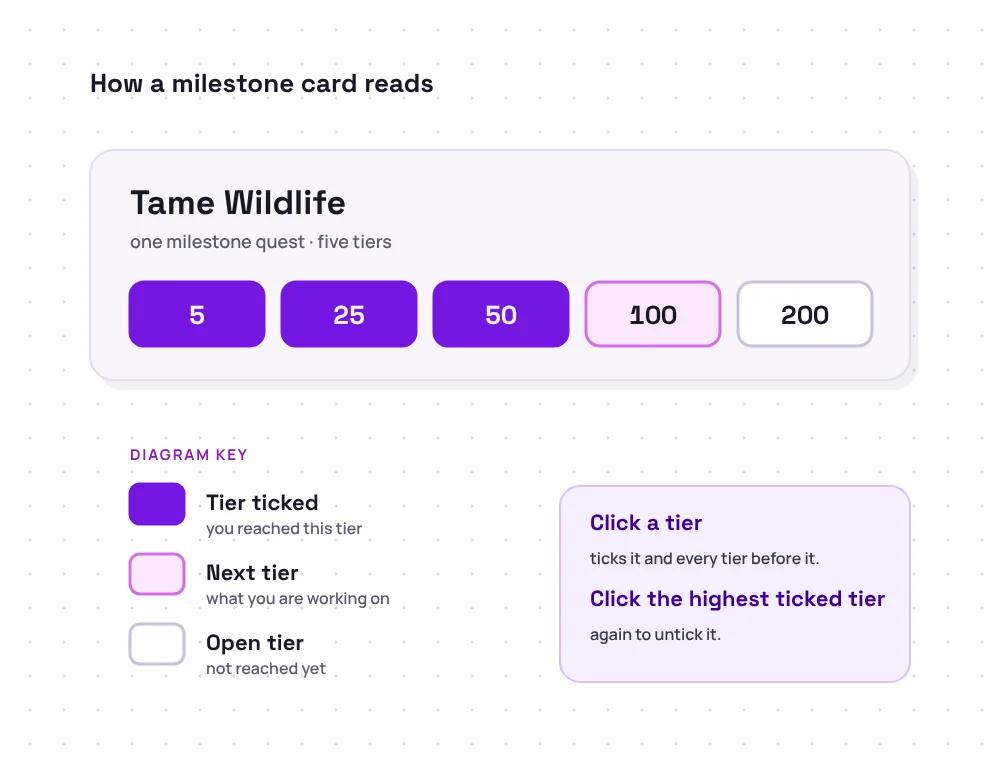
Diagram of a milestone card: Tame Wildlife with tiers 5, 25 and 50 ticked, 100 marked as next and 200 open, plus a key for ticked, next and open tiers
What it is
A one-page web app with one card per milestone quest
Made by
GitHub user UltCombo (credited on the page as ult_br)
Built with
Next.js 10 and React 17
Data
71 milestone quests from Chapter 2 Season 6 (2021)
Progress
Saved in your browser's localStorage
Cost
Free download of the source code

02 Features

Small by design. Here's everything it does.

FN Tracker is one page and one config file. These are its features, in the order you'll notice them.

Every Season 6 milestone on one page

All 71 milestone quests from Chapter 2 Season 6 appear as one list, alphabetically, from Assist Teammates with Eliminations to Use Shield Potions. Each card shows the quest name and its five tier targets.

The groups on the right are ours, to show the mix. FN Tracker itself shows a single list.
  • Combat22
  • Resources and gold13
  • Wildlife and foraging13
  • Travel and looting11
  • Quests and bounties6
  • Team and items6
02 · Ticking

Five tiers, one click

Click a tier and it's ticked along with every tier before it. Click your highest ticked tier again to untick it.

03 · Saving

Progress that stays put

Each quest's ticked position is stored in your browser's localStorage under a key such as milestone.Catch Fish. Close the tab, come back next week, and it's still there, as long as you use the same browser and address.

A config file you can read and change

The whole list is a plain JavaScript array in config.js: a name and five numbers per quest. Update it for a newer season, delete what you don't care about, or add personal goals. If the dev server is running, the page reloads when you save.

How to edit the milestone list
export const quests = [ { name: 'Catch Fish', milestones: [3, 15, 50, 125, 250], }, { name: 'Tame Wildlife', milestones: [5, 25, 50, 100, 200], }, // …69 more ];
05 · Privacy

No account, no sign-in

There are no forms or login screens, and the page code doesn't contact Epic Games or anyone else. It has nothing to ask for because it never looks anything up.

06 · Hosting

Ready for static hosting

The build script exports plain files to a docs/ folder with a /fntracker base path and a .nojekyll file, which is exactly what GitHub Pages expects. You get a copy you can open on your phone.

03 How it works

From ZIP file to ticked tiers in four stages

FN Tracker has no installer. You run it with Node.js, the same way you'd run any small Next.js project.

  1. 1

    Download the ZIP

    Get the source code of the master branch and unzip it. The folder is called fntracker-master.

    fntracker-master.zip
  2. 2

    Install the packages

    With Node.js installed, open a terminal in the folder and install the dependencies listed in package.json.

    npm install
  3. 3

    Start the app

    Run the development server, then open the /fntracker address in your browser.

    npm run dev
  4. 4

    Tick tiers as you play

    Click a tier when you reach it in the game. Your ticks are saved in that browser automatically.

    localhost:3000/fntracker

Using Node.js 17 or newer? Next.js 10 may stop with an ERR_OSSL_EVP_UNSUPPORTED error. The fix is one setting, covered in Troubleshooting.

04 Use cases

Who it's useful for, five years on

FN Tracker was made for one season, but a tidy checklist and a small codebase still have uses.

  1. Planning a milestone grind

    Seeing every tier target at once makes it easy to spot which quests fit how you already play, and which are one session away from the next tier.

  2. A record of Chapter 2 Season 6

    The list is a snapshot of the 71 Season 6 milestones and their targets, from Catch Fish to Thank the Bus Driver. It's handy reference if you're writing about or remembering that season.

  3. A template for a newer list

    Swap in different names and targets in config.js and you have a tracker for whatever five-step goals you set yourself.

  4. A small Next.js project to learn from

    One page, one config file and one storage package. It's a readable example of React state saved to localStorage, with no extra machinery around it.

  5. Your own hosted copy

    Export it to static files, publish them on GitHub Pages, and your checklist opens in a phone browser with nothing to install.

06 Compatibility

What it runs on, and what it doesn't touch

FN Tracker is a web page, so the real requirement is Node.js to run it locally and a browser to use it. It doesn't matter which device you play Fortnite on, because FN Tracker never connects to the game.

The Node.js notes come from the project's own files: package-lock.json pins Next.js 10.0.9, which bundles webpack 4.

FN Tracker compatibility reference
Item Status and notes
Windows, macOS, Linux Runs
Anywhere Node.js and npm run. There's nothing OS-specific in the app. On Windows, the optional build script's final touch step needs Git Bash or WSL.
Node.js 16 and older Runs as-is
Next.js 10 requires Node.js 10.13 or newer.
Node.js 17 and newer Needs a setting
Set NODE_OPTIONS=--openssl-legacy-provider before npm run dev or npm run build.
Browsers Modern browsers
Chrome, Edge, Firefox or Safari with JavaScript and local storage enabled.
Phones and tablets Via a hosted copy
Open a static copy, for example on GitHub Pages, in a mobile browser. Each device keeps its own ticks.
Your Fortnite platform Not connected
PC, console or mobile makes no difference. FN Tracker doesn't read game data.
Current Fortnite season 2021 data
The bundled list is Chapter 2 Season 6. Edit config.js to track anything newer.

07 Installation and setup

Set it up once, then it's one command

  1. Install Node.js

    Install Node.js from its official website. npm is included. Open a new terminal and check both:

    node -vnpm -v
  2. Download and unzip FN Tracker

    Use the button in the Download section and unzip fntracker-master.zip.

  3. Open a terminal in the folder

    cd fntracker-master
  4. Install the dependencies

    This downloads Next.js, React and the storage package into node_modules. Warnings about old packages are expected.

    npm install
  5. Start it and open the right address

    Then open http://localhost:3000/fntracker. Plain localhost:3000 shows a 404 page because of the project's base path.

    npm run dev
  6. Optional: build static files

    Exports the site to docs/ for GitHub Pages. See the hosting guide.

    npm run build

08 Download

Download FN Tracker

The complete FN Tracker source code as a ZIP of the project's master branch on GitHub, ready to unzip and run with Node.js.

Package
Source code ZIP
Branch
master
Runs on
Windows, macOS, Linux
Requires
Node.js and npm
Price
Free
Host
github.com
Download FN Tracker
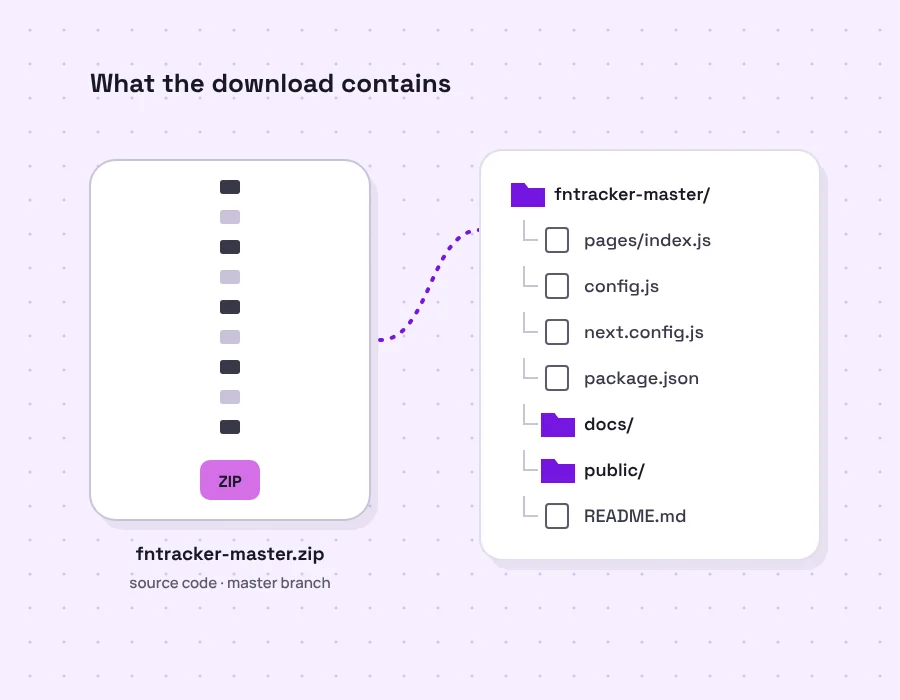
Diagram of fntracker-master.zip and its contents: pages/index.js, config.js, next.config.js, package.json, docs, public and README.md

09 Release information

One day of commits, unchanged since

FN Tracker has no tagged releases. The download is whatever is on the master branch, and that hasn't changed since 28 March 2021.

Last commit
28 March 2021
Commits
9, all on 28 March 2021
Tagged releases
None
package.json version
0.1.0
Framework
Next.js 10.0.9 · React 17.0.1
Storage package
use-local-storage-state 9.0.2
Milestone data
Chapter 2 Season 6, 71 quests
Licence file
None included

Commit history, newest first

  1. c57ce0fdocs: Update title for SEO purposes
  2. 0bdad0adocs: Add readme
  3. a076fa9fix: Disable jekyll processing
  4. a3c2e14chore: Rebuild
  5. 5ec6d7ffix: Update basePath for GitHub Pages
  6. 715d055fix: Update basePath for GitHub Pages
  7. 10471b2fix: Add .nojekyll
  8. 5ef3e7fchore: move out to docs to enable GitHub pages
  9. d750332feat: Init

10 Troubleshooting

Symptom, cause, fix

The problems people actually run into with a 2021 Next.js project on today's tools. The full troubleshooting guide has more detail.

ERR_OSSL_EVP_UNSUPPORTED on npm run dev

CauseNode.js 17+ ships OpenSSL 3. The webpack 4 inside Next.js 10 uses a hash it no longer allows by default.

FixRun NODE_OPTIONS=--openssl-legacy-provider npm run dev. In PowerShell, set $env:NODE_OPTIONS first. Or use Node.js 16.

404 page at localhost:3000

Causenext.config.js sets the base path to /fntracker.

FixOpen http://localhost:3000/fntracker.

"npm" is not recognized

CauseNode.js isn't installed, or the terminal was opened before the install finished.

FixInstall Node.js, then open a new terminal and check npm -v.

Port 3000 is already in use

CauseAnother program, or an earlier FN Tracker, is using it.

Fixnpm run dev -- -p 3001, then open localhost:3001/fntracker. That counts as a new address, so your earlier ticks won't show there.

docs/index.html opens blank

CauseThe exported files load scripts from /fntracker/_next/, which doesn't exist when you double-click the file.

FixUse npm run dev, or serve docs/ under /fntracker/, for example on GitHub Pages.

"touch" is not recognized during npm run build

CauseThe build script ends with the Unix touch command, which Windows doesn't have.

FixThe export has already finished. Create an empty docs/.nojekyll file yourself, or build in Git Bash or WSL.

My ticks disappeared

CauseProgress belongs to one browser at one address. Private windows and clearing site data remove it.

FixGo back to the same browser and address. Keep a backup with the snippet in our saving guide.

One quest reset after editing config.js

CauseProgress is stored under milestone. plus the quest name, so a renamed quest gets a new, empty key.

FixRestore the old name, or copy the old value to the new key in your browser's storage panel.

12 Pros and cons

An honest weigh-up

Pros

  • Does one thing clearlyA single scrolling checklist of quests and tiers, with no menus to learn.
  • Sensible tick logicClicking a tier fills in the ones before it. Clicking again steps back one.
  • No accountProgress saves automatically in your browser, and nothing is sent anywhere.
  • Easy to changeThe list is one readable config file you can update yourself.
  • Free and hostableExports to static files for GitHub Pages, so it works on a phone too.

Cons

  • 2021 dataThe milestones are from Chapter 2 Season 6 and don't match the current game.
  • Setup needs a terminalThere's no installer. You need Node.js and a few commands.
  • Old toolchainNext.js 10 needs a workaround on Node.js 17+ and has known advisories.
  • Manual onlyIt doesn't read game progress, so you tick everything yourself.
  • No sync, no export buttonProgress stays in one browser unless you copy it out yourself.

13 FAQ

FN Tracker questions, answered

Twenty questions in two chapters. The markers under each chapter fill in as you read.

Chapter A · 10 questions

About FN Tracker and milestones

What the app is, who made it, and what it does and doesn’t track.

  • FN Tracker is a small web app that lists the 71 milestone quests from Fortnite Chapter 2 Season 6 and lets you tick off each quest’s five tiers as you reach them in the game. It was written with Next.js and React and published on GitHub in March 2021.

  • It was published by the GitHub user UltCombo, and the page itself credits “ult_br”. fntracker.org is an independent guide. We didn’t write the software and we’re not connected to its author.

  • No. It’s a fan-made hobby project. It isn’t made, approved or supported by Epic Games, and this guide isn’t either.

  • No. It never connects to your account or the game. You tick tiers by hand, so it only knows what you tell it. For kills, wins or K/D you need a stats site.

  • No. Its README is titled “Fortnite Tracker”, which causes confusion, but it’s a one-page milestone checklist and isn’t related to any player-statistics website.

  • The 71 milestone quests from Chapter 2 Season 6, such as Catch Fish, Tame Wildlife and Eliminations with Bows, each with five tier targets. Our milestone list guide shows every one.

  • No. The list hasn’t changed since March 2021, and Fortnite’s quests have changed many times since then. You can edit config.js to track a newer list.

  • No. It has no tournament, prize-money or ranking data, and Fortnite’s Ranked mode only arrived in May 2023, two years after FN Tracker’s last update.

  • Yes. All quests live in config.js as a name plus a list of tier targets. Add, remove or edit entries and the page updates. Renaming a quest resets that quest’s ticks, because progress is stored by name.

  • Yes. The source code is a free download from GitHub. Note that the repository doesn’t include a licence file, so it doesn’t formally grant permission to redistribute modified copies.

Chapter B · 10 questions

Download, setup, saving and fixes

Getting it running, where ticks are stored, and what to do when something goes wrong.

  • A ZIP of the project’s source code from the master branch on GitHub: the page code, config.js, package files and a pre-built docs folder for GitHub Pages. It isn’t an installer and contains no .exe.

  • To run it on your own computer, yes. Node.js and npm install the dependencies and start the local server. A hosted copy, such as one on GitHub Pages, only needs a browser.

  • Open http://localhost:3000/fntracker. The project sets a base path of /fntracker, so plain localhost:3000 shows a 404 page.

  • Node.js 17 and newer use OpenSSL 3, which the webpack inside Next.js 10 doesn’t expect. Set NODE_OPTIONS=--openssl-legacy-provider for that terminal session, or use an older Node.js LTS such as 16.

  • In your browser’s localStorage, under keys like “milestone.Catch Fish”. Each key holds the position of the highest tier you’ve ticked. Nothing is sent to a server.

  • No. Each browser and each web address keeps its own copy. You can move progress by copying the milestone keys with the backup snippet in our saving guide.

  • Delete the keys starting with “milestone.” in your browser’s storage panel, or clear the site data for that address. To reset one quest, click its highest ticked tier until none are ticked.

  • Yes, through a hosted copy. Publish the docs folder to GitHub Pages and open it in your phone’s browser. There’s nothing to install on the phone.

  • The download is plain source code from GitHub with no installer. The app asks for no login and stores only tier positions. Its 2021 dependencies are outdated, so run it locally rather than as a public server.

  • Not locally. There’s no installer, so the first setup needs npm commands. If you’d rather avoid the terminal entirely, use a hosted static copy instead.